Building a Personal Knowledge Pipeline: From Capture to Query
Table of Contents
The problem with capturing things
I capture a fair bit — notes from calls I’m actually part of, ideas, research I do on my own time for things I’m curious about. The capturing part was never the hard bit. The hard bit was that almost none of it got used again.
A transcript sitting in a folder is barely better than no transcript at all if the only way to get anything out of it is to remember it exists and go looking. I didn’t want a bigger archive. I wanted something I could actually query later — “what did we decide about X”, “where did that idea come from”, “what’s the current state of this thing I’ve been poking at for months” — without it turning into a second job just to keep tidy.
So over the last while I’ve been building a small personal pipeline that does three things: capture, organise, and keep itself current. None of it is exotic. Most of the pieces are free tools and a handful of scripts. The interesting part isn’t any single piece — it’s how they fit together.
A quick note before any of this: everything below is personal use only. Calls I record are ones I’m actually part of, with everyone’s knowledge, and I don’t use any of this for anything confidential or anything where someone else has an expectation of privacy I haven’t explicitly agreed with them on. A hobby club meeting, a personal catch-up over video call — fine, with consent. Nothing else.
Capture: the part I’d already solved
I’ve written before about the capture step itself — recording audio locally, transcribing it with a local speech-to-text model, and having an AI pass turn the raw transcript into a structured summary with a sensible title. Google Meet catch-ups, a call with a hobby group I’m part of, whatever — same process either way. No cloud recording service, no subscription, nothing leaving my machine except the summarising step.
This post picks up from where that one leaves off. Say you’ve got that: a folder steadily filling up with dated, reasonably well-structured summary files. What now?
The core idea: a knowledge layer, not a filing cabinet
The instinct when you’ve got a growing pile of files is to start organising them — folders within folders, elaborate naming schemes, a filing system. I tried that for a while and it didn’t hold up. The organising effort scaled with how much stuff I had, which meant it got worse exactly when I needed it least.
What worked better was leaving the files where they are and building a thin layer on top — a set of small, deliberately linked notes that reference the real files rather than replace them. Nothing gets copied, nothing gets duplicated into a second, competing structure. The notes exist to answer questions; the files underneath stay exactly where they’d naturally end up anyway.
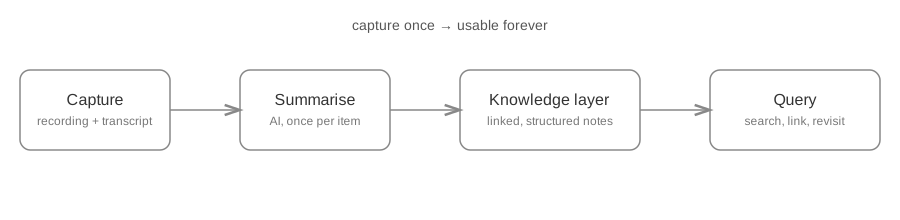
The part that made this sustainable rather than a chore was drawing a hard line between two kinds of work:
- Anything mechanical — figuring out which topic something belongs to, spotting a date, filing something in a consistent place — is done by a small script. It’s boring, repetitive, and needs to be predictable every single time. Code is good at that; I don’t want an AI making a judgement call about something that should never require judgement.
- Anything that’s genuinely synthesis — actually summarising a conversation, spotting a theme across several notes, writing a short “here’s where this stands” paragraph — is the one place AI earns its keep. That’s the part a script fundamentally can’t do well.
Once I stopped trying to make one tool do both jobs, the whole thing got a lot more reliable, and a lot less effort to trust.
Notes that stay current on their own
The single most useful piece turned out to be small: a note per topic (a person, a project, a recurring theme) that gets incrementally refreshed rather than rewritten from scratch.
The mechanism is simple. Each of these notes remembers when it was last updated. When something new comes in — a new call summary, a new bit of research — a script checks whether there’s anything newer than that date. If there isn’t, nothing happens: no AI call, no cost, no output. If there is, only the new material gets handed to the AI, along with the note’s current content, with an instruction along the lines of “here’s the current summary, here’s what’s new, update it.”
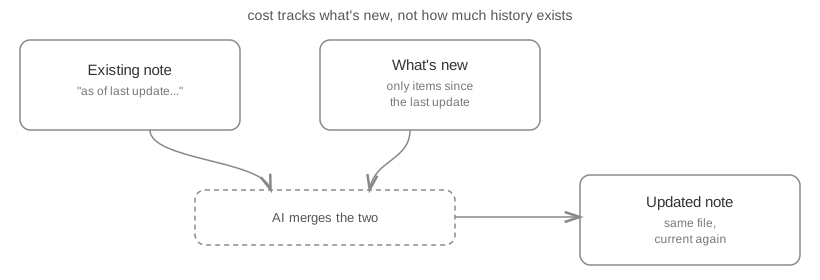
That distinction — feeding in only what changed, not the full history every time — matters more than it sounds like it should. Cost and effort track how much new information there actually is, not how long the topic has existed. A note about something I’ve been tracking for two years costs the same to update today as one I started last week, as long as there’s roughly the same amount of new material behind it. Without that, the sensible thing eventually stops being sensible, and it quietly gets abandoned.
Keeping longer-running things current
Calls and recordings are one-off events: a thing happens, it gets transcribed, it gets summarised, done. Research is a different shape of problem entirely. I run research projects across a fairly wide range of topics — things I dig into over weeks or months, adding material as I go, with no single transcript and no natural “done” moment except the one I decide on myself.
Because of that, a research project doesn’t get a one-shot summary. It gets a checkpoint: at a point I choose — wrapping the topic up, or just coming back later to push it further — I write a short status note directly inside wherever that project’s material already lives. Not copied anywhere, not moved into a separate staging area; it sits right alongside the project’s own working files. A separate, fully automatic pass periodically checks for any of these notes that are new or have changed since it last looked, and folds whichever ones qualify into the same knowledge layer everything else lives in.
The important part is what does not move: only the synthesis and a pointer back to the source material go into the knowledge layer. The actual working files — drafts, source material, whatever the research itself consists of — stay exactly where they are. That’s deliberate. The point of the checkpoint isn’t to replace the deep material with a paragraph, it’s to make sure the paragraph exists and that I can still drop back into the full depth of the subject whenever I need to, rather than being stuck with only what I thought was worth summarising at the time.
Revisiting a project later is exactly the same action as checkpointing it the first time: write the note again, in place, with the current picture. Nothing accumulates, nothing needs cleaning up, and the knowledge layer just reflects whatever the most recent checkpoint said.
Making it disappear into the routine
None of this is worth much if it’s a separate thing I have to remember to run. The last piece was folding the mechanical parts — the filing, the linking, the “check if anything changed” pass — into a routine I already run every day anyway, rather than a standalone chore.
Because none of that mechanical work involves AI (it’s all the deterministic side of the split from earlier), it costs nothing to run it every single morning regardless of whether anything actually changed. On a normal day it’s silent — nothing new, nothing happens. On a day where something did change, it just quietly shows up already organised, already linked, without me having to go and do anything about it.
That’s really the whole point. Not a bigger archive, not a fancier filing system — a system that keeps itself roughly current with the least amount of my own attention I can get away with, so that when I actually go looking for something, it’s already there.
The technology, concretely
All of the above is deliberately described in concepts rather than tools, but for anyone curious what’s actually running underneath, it’s a small, ordinary stack:
- Claude Code — an agentic CLI tool. It’s what actually runs the automation: invoked from shell scripts for the mechanical, everyday steps, and used interactively inside a research project’s own folder when I’m writing a checkpoint note.
- Claude — the model behind Claude Code, doing every genuine synthesis step: summarising a transcript, refreshing a rolling summary with only what’s new, writing a research checkpoint. Nowhere else.
- Python — the deterministic layer. Small, boring scripts that do the filing, the matching, the date handling — everything on the “mechanical” side of the split described above, precisely because it has to behave the same way every time, not be left to a model’s judgement.
- Obsidian — the knowledge layer itself. Underneath, it’s nothing more than a folder of plain Markdown files; Obsidian adds
[[links]]between them and a graph view over the top, without owning or duplicating anything that lives elsewhere. - Obsidian frontmatter — the small YAML block at the top of each note (status, topic, a link back to its rolling summary, a path back to the source material) that turns a plain note into something a script can also read and update. That’s the actual hinge point of the whole system: Python can adjust these properties directly, on disk, without touching Obsidian at all, which is what makes the automatic refreshing possible in the first place.
None of these pieces is exotic by itself. The value is entirely in the handoff between the deterministic half (Python, doing the boring parts reliably) and the generative half (Claude, doing only the parts that actually need judgement) — mediated by nothing more complicated than plain Markdown files and a few YAML properties that both a human and a script can read.
Still evolving. The capture step was the easy 20%; figuring out what to do with everything afterwards was the other 80%.